Unlock Your Productivity with the Dell WD22TB4 Thunderbolt 4 Dock
Our Product Insight
The Dell WD22TB4 Thunderbolt 4 Dock is a powerful tool designed to enhance your workspace. Whether you're a remote worker, a student, or a creative professional, this dock aims to streamline your connectivity needs. With its two Thunderbolt 4 ports and Gigabit Ethernet LAN port, it promises to deliver high-speed data transfer and a seamless connection to multiple devices. But how does it really perform in everyday use? Let’s dive in!Key Features
Thunderbolt 4 Ports
One of the standout features of the Dell WD22TB4 is its two Thunderbolt 4 ports. This means you can connect up to two 4K displays or one 8K display, making it ideal for graphic designers, video editors, and anyone who requires high-resolution screens. The versatility of Thunderbolt 4 also allows for daisy-chaining multiple devices, which can significantly reduce cable clutter on your desk.Gigabit Ethernet LAN Port
In today’s world, a reliable internet connection is crucial. The Gigabit Ethernet LAN port on this dock ensures that you have a stable and fast internet connection, which is particularly beneficial for those who rely on video conferencing or large file transfers. Say goodbye to the frustrations of slow Wi-Fi and enjoy a seamless online experience.
Additional Connectivity Options
Beyond the Thunderbolt ports, the dock also includes several USB-A and USB-C ports, allowing you to connect a variety of peripherals such as keyboards, mice, and external storage devices. This makes it a versatile hub for all your devices, keeping everything organized and easily accessible.
Who It's For
The Dell WD22TB4 Thunderbolt 4 Dock is particularly suited for: - Remote Workers: If you’re working from home or in a hybrid setup, this dock can help you create a more efficient workspace by connecting multiple devices with ease. - Creative Professionals: Graphic designers, video editors, and photographers will appreciate the ability to connect high-resolution displays and transfer large files quickly. - Students: With the rise of online learning, students can benefit from a reliable connection and the ability to connect their laptops to larger monitors for a better study experience.Pros and Considerations
Pros
- High-Speed Connectivity: The Thunderbolt 4 ports provide lightning-fast data transfer rates, which is a game-changer for those who work with large files. - Versatile Display Options: The ability to connect multiple displays enhances productivity and multitasking capabilities. - Robust Build Quality: As a product from Dell, you can expect a solid build that can withstand the rigors of daily use.Considerations
- Size and Portability: While the dock is compact, it may not be the most portable option if you frequently travel with your devices. It’s designed more for a stationary setup.
- Compatibility: Ensure that your laptop supports Thunderbolt 4 to take full advantage of the dock’s features. Some older devices may not be compatible.
In summary, the Dell WD22TB4 Thunderbolt 4 Dock is a powerful addition to any workspace, especially for those who require high-speed connectivity and multiple device connections. With its impressive features and robust performance, it can significantly enhance your productivity. If you’re looking to simplify your workspace and improve your connectivity, this dock is definitely worth considering. Check current price to see if it fits your needs and budget!
1. Enhance your connectivity experience with the Highwings 4K Long HDMI Cable 10M, which supports HDR10 and ensures high-speed data transfer for all your devices. 2. For seamless printing and data transfer, consider the rhinocables USB 2.0 Printer Cable, featuring gold connectors for optimal performance and universal compatibility. 3. If you're setting up a medical workstation or any other application requiring reliable connections, the ZCZQC 10PCS RG6 Coaxial Connectors are weatherproof and compatible with various coaxial cables. 4. Boost your device's performance with the GELRHONR 100W USB C Extension Cable, which supports fast charging and delivers impressive 10G data transfer speeds. 5. For ultra-fast data transfer and crystal-clear video output, the RIIEYOCA 100W USB C Extension Cable Short is an excellent choice, supporting 8K@60Hz UHD video.
More Products You Might Like
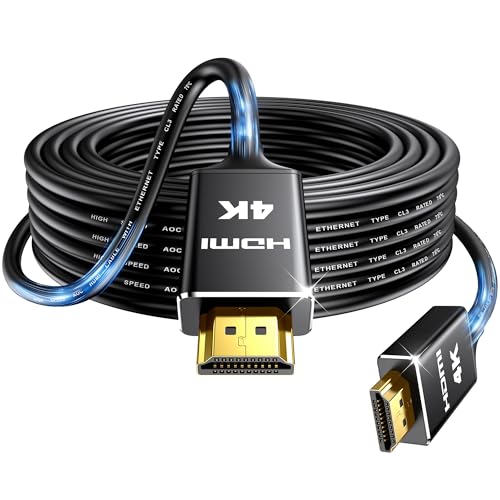
Highwings 4K Long HDMI Cable 10M | in-Wall CL3 Rated HDMI Ca

Cable Matters Snagless Cat 6a, Cat6a (SSTP, SFTP) Shielded E

Silkland 4K HDMI Cable 2M, Nylon Braided 18Gbps High Speed,

GADLANE Camping Electric Hook Up Cable - Heavy Duty 10 Metre

SinLoon 90Elbow USB C Extension Cable - Flat Silicone Type-C
Disclaimer: This article has been generated through our AI content insight system and is intended for general informational purposes only. Please carry out your own research and review product details directly before making any purchase decisions.