Unlock Your Productivity with the Omars Docking Station Dual Monitor: A Comprehensive Review
Our Product Insight
In today’s fast-paced digital world, having the right tools can make all the difference in your productivity. The Omars Docking Station Dual Monitor is designed to enhance your workspace by providing a seamless connection for multiple devices. This 11-in-1 USB C Hub not only allows you to connect dual monitors but also offers a variety of ports to accommodate all your peripherals. Whether you’re a remote worker, a student, or a creative professional, this docking station could be the solution to your connectivity needs.Key Features
The Omars Docking Station is packed with features that cater to a wide range of users. Here are some of the standout features:- Dual HDMI Outputs: With support for 4K resolution, you can enjoy stunning visuals across two monitors. This is perfect for multitasking, allowing you to have multiple applications open at once without compromising on screen quality.
- VGA Port: For those who still use older monitors, the VGA port ensures compatibility, making it versatile for various setups.
- Ethernet Port: Say goodbye to unreliable Wi-Fi connections. The Ethernet port provides a stable internet connection, which is essential for video conferencing and online work.
- 100W Type C Power Delivery: Charge your laptop quickly and efficiently while using the docking station. This feature is especially useful for power-hungry devices.
- Four USB Ports: With multiple USB ports, you can connect your keyboard, mouse, external drives, and other peripherals without hassle. This makes it easy to keep your workspace organized.
- Data Transfer: The docking station supports high-speed data transfer, ensuring that you can quickly move files between devices.
These features make the Omars Docking Station a versatile tool for anyone looking to enhance their workspace.
Who It's For
The Omars Docking Station is designed for a variety of users: - Remote Workers: If you work from home, having dual monitors can significantly improve your workflow. This docking station allows you to set up multiple screens, making it easier to manage tasks and communications. - Students: For students juggling various assignments and research, the ability to connect multiple devices can streamline study sessions and group projects. - Creative Professionals: Graphic designers, video editors, and other creatives will appreciate the high-resolution outputs and the ability to connect multiple monitors for editing and design work. - Tech Enthusiasts: If you love gadgets and want to maximize your tech setup, this docking station provides the flexibility to connect various devices seamlessly.Pros and Considerations
While the Omars Docking Station has many benefits, it’s important to consider both sides:Pros:
- Versatile Connectivity: With multiple ports, it caters to a wide range of devices.
- High-Quality Display: The dual HDMI outputs with 4K support are a game-changer for visual tasks.
- Stable Internet Connection: The Ethernet port is a significant advantage for those who need reliable connectivity.
Considerations:
- Compatibility: While it works with many laptops, it’s essential to check if your specific model is compatible.
- Size: Depending on your workspace, the docking station might take up some desk real estate.
In conclusion, the Omars Docking Station Dual Monitor is a powerful tool that can transform your workspace into a productivity powerhouse. With its array of features and versatility, it’s worth considering for anyone looking to enhance their connectivity and efficiency. Whether you’re working from home, studying, or creating, this docking station has something to offer for everyone. Check current price and see how it can fit into your setup today!
1. Enhance your connectivity with the Highwings 4K Long HDMI Cable 10M, perfect for seamless dual monitor setups that support HDR10 and high-speed data transfer. 2. Ensure reliable printer connections with the rhinocables USB 2.0 Printer Cable, which offers high-speed data transfer and universal compatibility for all your printing needs. 3. For those working with medical equipment, the ZCZQC 10PCS RG6 Coaxial Connectors provide a weatherproof solution compatible with various shielded cables. 4. Maximize your data transfer capabilities with the GELRHONR 100W USB C Extension Cable, designed for fast charging and 4K video output to elevate your workspace. 5. Consider the RIIEYOCA 100W USB C Extension Cable Short for high-speed data transfer and 8K video output, making it an excellent addition to your dual monitor setup.
More Products You Might Like

Amazon Basics 4K HDMI Cable 1.8m - 18Gbps High Speed with Et
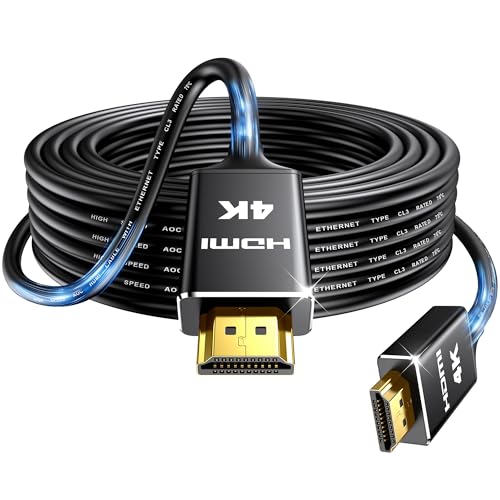
Highwings 4K Long HDMI Cable 10M | in-Wall CL3 Rated HDMI Ca

ANLINK 3M/10Ft Flat Power Extension Cable for USB C Enabled

CHENLUKJ Ethernet Cable 0.5m, High Speed 1000mbps 250Mhz/s C
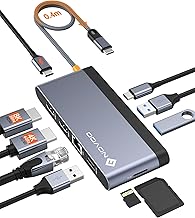
NOVOO USB C Docking Station, 10-in-1 USB C Dock Dual 4K@60Hz
Disclaimer: This article has been generated through our AI content insight system and is intended for general informational purposes only. Please carry out your own research and review product details directly before making any purchase decisions.