

Checkout on the retailer site
Payment is handled by the retailer
Check return terms
Retailer or seller terms apply
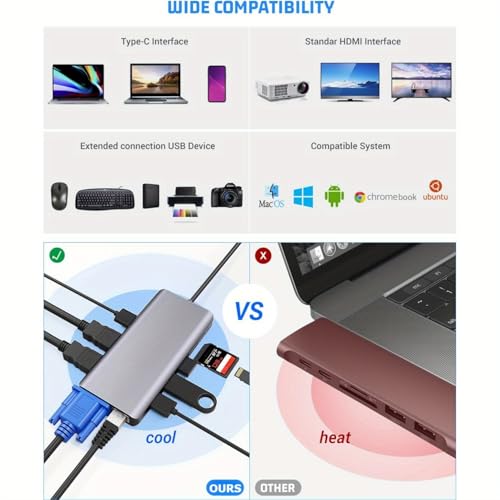
The 12 in 1 Docking Station is ideal for professionals and creatives who require extensive connectivity options for their laptops. It caters to users of MacBook Pro/Air, as well as various Windows laptops, offering compatibility with a range of operating systems. This hub facilitates multitasking with quadruple display capabilities and includes essential ports like 4K Dual HDMI and VGA, making it perfect for presentations or graphic work. Its support for multiple devices and high-speed data transfer ensures efficiency for those in need of reliable performance in a busy work environment.
This docking station is best suited for users needing to connect multiple peripherals simultaneously. It fits laptops with a full-function USB-C or Thunderbolt 3 port. To ensure longevity, keep the device in a dry environment and avoid exposure to moisture. The package includes the docking station and necessary cables for immediate setup.
12-in-1 USB-C Docking Station for MacBook & Laptops - 4K HDMI, VGA, Ethernet, USB 3.0, SD/TF Slots
Key Takeaway
Transform your workspace with this versatile 12-in-1 Docking Station, designed to enhance your MacBook Pro, Air, or compatible laptops from Dell, HP, and Lenovo. For just Check price on Amazon, enjoy the convenience of connecting up to four displays with 4K Dual HDMI, along with essential ports for Ethernet, USB 3.0, and SD/TF cards. Ideal for professionals and creatives alike, this docking station streamlines your setup and boosts productivity, making it a must-have accessory for anyone looking to maximize their laptop's potential.
Frequently Asked Questions
What is 12 in 1 Docking Station?
The 12 in 1 Docking Station is a versatile USB C hub designed for laptops such as MacBook Pro/Air/M1, Dell, HP, and Lenovo. It supports quadruple display capabilities and connects multiple devices through various ports.
How much does 12 in 1 Docking Station cost?
The 12 in 1 Docking Station is priced at Check price on Amazon. This price offers excellent value considering its extensive features and compatibility with multiple devices.
What are the key features of 12 in 1 Docking Station?
Key features of the 12 in 1 Docking Station include 4K dual HDMI outputs, VGA, Ethernet, and multiple USB 3.0 ports. It also supports Power Delivery 3.0 and has SD/TF slots for easy data transfer.
Who is 12 in 1 Docking Station best for?
The 12 in 1 Docking Station is ideal for professionals, students, and creatives who require multiple displays and connections. It's particularly beneficial for users of MacBook Pro/Air/M1 and other compatible laptops looking to enhance their productivity.
How do I use/care for 12 in 1 Docking Station?
To use the 12 in 1 Docking Station, simply connect it to your laptop's USB C port and plug in your devices. For care, ensure it is kept in a dry environment and avoid exposing it to extreme temperatures to maintain optimal performance.
Check delivery details
Delivery estimates are shown by the retailer
External retailer checkout
Payment is handled by the retailer
Check current prices
Check current retailer offers
Expert Support
Here to help you choose