



Checkout with Confidence
Payment Security Guaranteed
Return with Ease
Fast & Hassle-Free Process
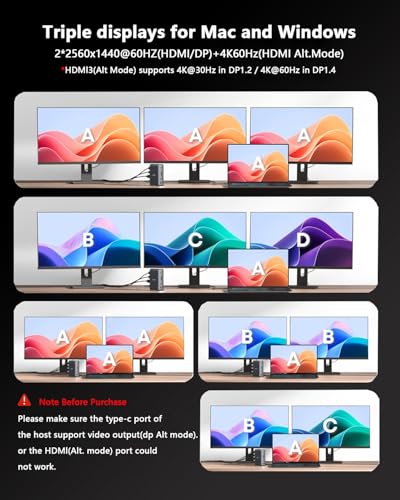
The WAVLINK Displaylink Laptop Docking Station is ideal for professionals and creatives who require enhanced connectivity options for their laptops. With the ability to connect up to three displays, including stunning 4K video output, this docking station is perfect for multitasking, graphic design, and video editing. It supports various operating systems, including macOS with M-series chips and Windows, making it a versatile choice for diverse users. Additionally, the extensive array of ports, including USB-C, USB-A, and Gigabit Ethernet, addresses the needs of users looking for high-speed data transfer and stable network connections.
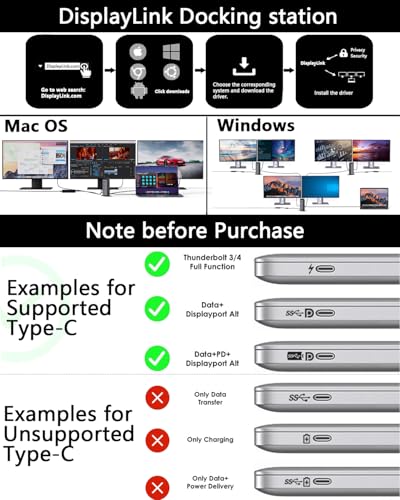
This docking station is designed for use in both home and office environments, facilitating seamless connections for laptops with USB-C or Thunderbolt 3/4 ports. It includes a variety of ports for connecting multiple devices simultaneously. Users should ensure their laptop's USB-C port supports video output and Power Delivery for optimal performance. Care should be taken to keep the device in a dry environment to maintain functionality.
WAVLINK Triple Display Docking Station - 3 HDMI, USB-C, 4K+Dual 2K, 100W Charging, 5 USB Ports
Key Takeaway
Transform your workspace with this versatile laptop docking station that supports triple display capabilities, featuring 3 HDMI ports and dual 2K resolution for stunning visuals. Priced at £152.99, it's perfect for professionals and creatives who need to connect multiple devices seamlessly while enjoying 100W charging for your Mac or Windows laptop. With additional USB ports, Ethernet, and audio/mic inputs, this docking station is your all-in-one solution for a clutter-free and efficient setup.
Frequently Asked Questions
What is WAVLINK Displaylink Laptop Docking Station?
The WAVLINK Displaylink Laptop Docking Station is a versatile docking solution that allows users to connect multiple displays and peripherals. It supports triple display output with 3 HDMI ports and offers 4K + dual 2K resolution capabilities.
How much does WAVLINK Displaylink Laptop Docking Station cost?
The price of the WAVLINK Displaylink Laptop Docking Station is £152.99. This docking station provides excellent value by enabling multiple connections and 100W charging for compatible devices.
What are the key features of WAVLINK Displaylink Laptop Docking Station?
Key features of the WAVLINK Displaylink Laptop Docking Station include 3 HDMI ports for multiple displays, 5 USB ports for connecting peripherals, and 1Gbps Ethernet for fast internet connectivity. It also supports audio/mic input and has an SD/TF card reader.
Who is WAVLINK Displaylink Laptop Docking Station best for?
The WAVLINK Displaylink Laptop Docking Station is ideal for professionals and creatives who need to connect multiple monitors and devices. It's particularly beneficial for users of M1, M2, M3, and M4 Mac systems, as well as Windows laptops.
How do I use/care for WAVLINK Displaylink Laptop Docking Station?
To use the WAVLINK Displaylink Laptop Docking Station, simply connect it to your laptop via USB-C and plug in your monitors and peripherals. For care, ensure the device is kept in a dry, cool place and regularly check for firmware updates to maintain optimal performance.
Fast Delivery
Quick & reliable shipping
Secure Shopping
100% secure transactions
Great Prices
Competitive deals daily
Expert Support
Here to help you choose
More Products You Might Like from ethernetcable
View All


Please Note: When you order through these links, we may earn a commission at no additional cost to you.